

The GDPR Compliance Checklist That Checks Your Website, Not Your Paperwork

Here’s the problem with most GDPR checklists.
They tell you what you should have. A policy. A legal basis. A record of processing. Someone’s name on a document.
None of that is what gets checked.
“Is my website GDPR compliant?” is not a question you answer from a folder. You answer it in a browser.
In September 2025 the French data protection authority fined an online retailer €150 million. The problem wasn’t a missing document. Trackers were landing on visitors’ devices the moment they arrived, before anyone had touched the banner.
Same authority, same day, another €325 million in fines on related grounds.
The evidence came from the website itself.
So this checklist works the other way round: website GDPR compliance measured on the website. Eight checks you run on your own site, in the order a visitor actually meets them.
How to use this
Most checks have the same four parts:
- What the law actually says
- How to check it
- What a bad result looks like
- What fixes it
Most take under ten minutes. None of them needs a developer. This is how to check if a website is GDPR compliant without hiring anyone to do it for you.
First, this isn’t legal advice. A few of these checks end in a judgement call, and that call is yours to make with your adviser.
Second, it isn’t the whole of the regulation. This covers the surface your visitors touch. There’s a section near the end on what’s missing.
And run every browser check in a private window with caching off. A browser that’s already been to your site will lie to you.
Check 1: What loads before anyone agrees to anything
Your browser starts talking to other companies’ servers long before a visitor reads your banner, let alone your privacy policy.
What the law actually says. The first rule you hit isn’t the GDPR. It’s the ePrivacy Directive.
Article 5(3) says you can’t store information on someone’s device, or read what’s already there, without consent.
Two exceptions. When it’s done for the sole purpose of carrying out the transmission of a communication, and when it’s strictly necessary to provide a service the user explicitly asked for.
Notice what’s missing from all of that. The word “cookie” never appears in Article 5(3).
The European Data Protection Board spelled this out in guidelines adopted in October 2024. JavaScript that tells a browser to fire off a request carrying the data you want? Same article.
They also added the part vendors skip: being in scope doesn’t automatically mean you need consent — an exception still has to be assessed.
How to check it.
- Open your site in a private window.
- Hit F12, go to the Network tab, tick “Disable cache”.
- Load the home page and don’t touch the banner.
- Right-click the column header, switch on the Domain column, then click it to sort.
- Write down every domain that isn’t yours.
- Open Application (Storage in Firefox) and look at Cookies, Local storage and Session storage.

One reload, banner untouched, sorted by domain. Three domains answered before the visitor agreed to anything. A demo page on the reserved example domains — but the ordinary picture.
Then do the same for storage. Everything sitting in there got written before anyone agreed to anything.
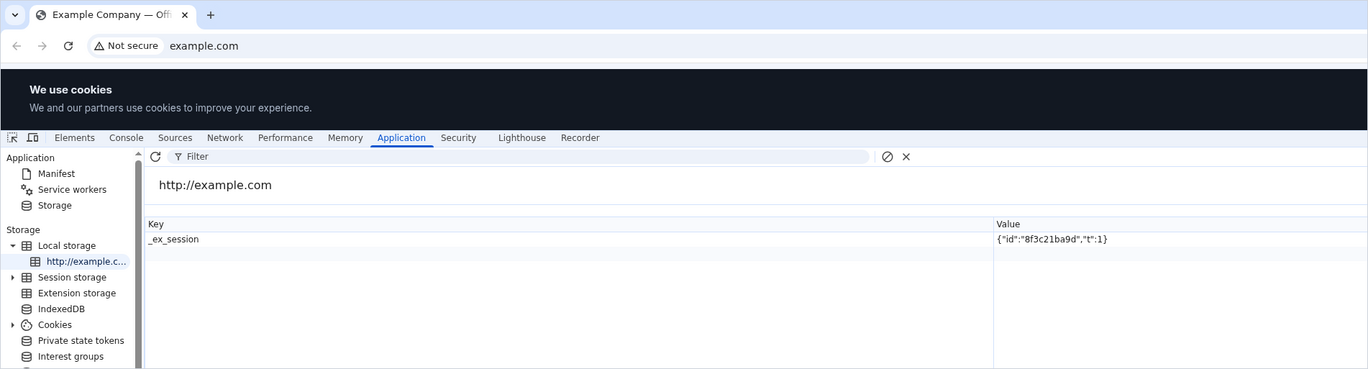
Same page, nothing clicked, banner still up. An identifier is already in local storage, with a cookie beside it.
What a bad result looks like. A third-party domain you never knowingly installed, plus a stored identifier, both sitting there before a single click.
Four that catch people out regularly:
- Fonts loaded from someone else’s network
- An embedded video player
- A chat widget
- A map
Two things surprise owners: how long the list is, and how early the first name turns up.
In July 2026 the analytics company Statable crawled 1,845 European domains.
Of the 1,186 that returned anything measurable, 641 sent data to a third party before the visitor clicked, typed or answered the banner.
The median site made its first outside request 419 milliseconds in.
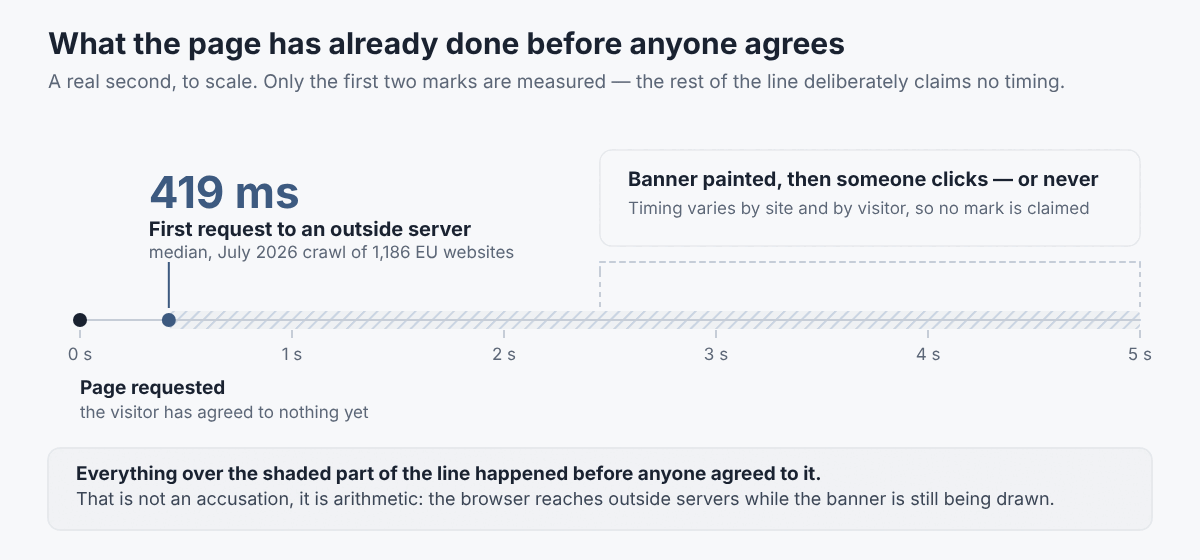
The gap between the first outside request and the moment anyone agrees. Median time to the first third-party request in the July 2026 crawl: 419 ms.
What fixes it. Three options, and they cost wildly different amounts.
Collect consent for all of it. That means a banner which genuinely holds those requests back until someone agrees. Harder to build properly than it looks.
Delete what you’re not using. Plenty of sites are still carrying a tag nobody has opened in two years.
Swap the one thing you actually depend on. Usually that’s analytics, and usually that’s where the swap is easiest.
Page views, sources, countries, conversions. You can count all of it without an identifier that follows someone from site to site.
Tools built that way get sold as GDPR-ready web analytics. With one such tool, there’s no cookie, no stored identifier, and the data stays in the EU.
Whether that means your site stops needing a banner is a call for you and your adviser. No supplier can hand you that answer.
Either way, run the check again when you’re done. The only version that counts is the one your site actually performs.
If you have a banner, this is where you find out whether it’s a control or a decoration.
What the law actually says. The cookie banner requirements start with the definition of consent: freely given, specific, informed and unambiguous. A statement, or a clear affirmative action.
The regulation’s recitals are blunt about what doesn’t count: silence, pre-ticked boxes, inactivity. The Court of Justice made that binding in Planet49, and added that the rules don’t change depending on whether what’s stored counts as personal data.
Scrolling doesn’t count either: the Board’s guidelines say it can never satisfy the requirement.
The Cookie Banner Taskforce settled the two arguments you’re most likely to have:
- Legitimate interest can’t be your legal basis for writing to or reading from a device under Article 5(3).
- A layer that offers a consent button but no refuse option? The vast majority of authorities treat that as an infringement in itself.
And withdrawing consent has to be as easy as giving it.
How to check it.
- Count the clicks it takes to accept, then to reject.
- If rejecting costs more, you already have your answer.
- Click reject, then reopen the Network tab from Check 1.
- Look for a permanent way to change that choice later — a footer link, not an email to support.
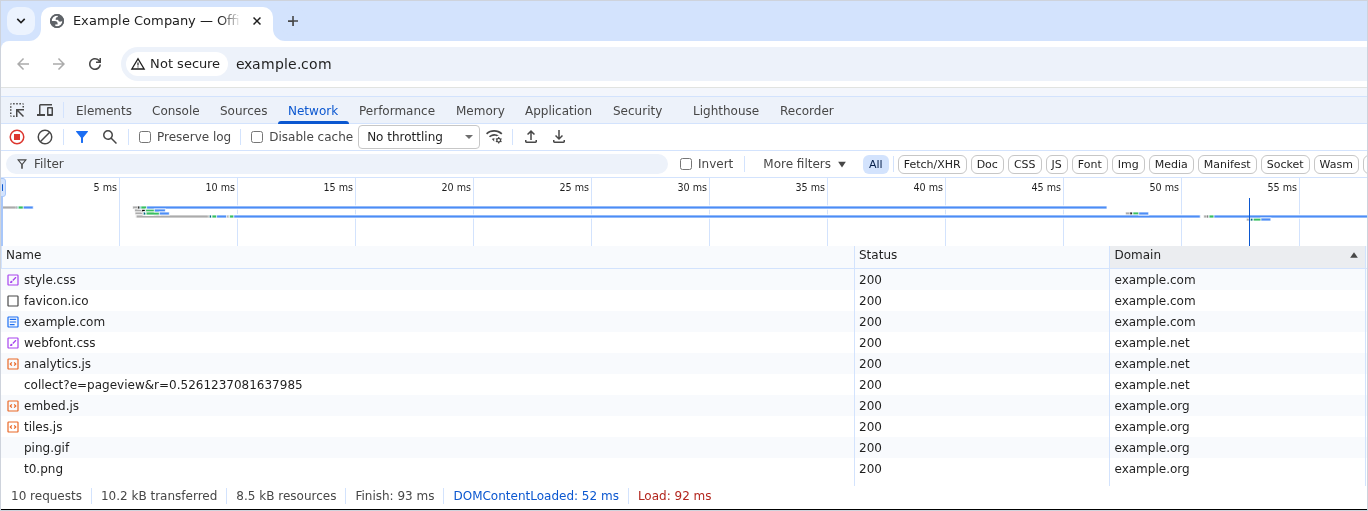
The same site after “Reject all”. The banner is gone — the choice was remembered. The next load still contacted both outside domains.
What a bad result looks like. Any one of these:
- You hit reject and the same requests go out anyway
- Refusing takes more clicks than accepting
- There’s no way to change your mind later without emailing support
The first one is the finding that produces fines. In the €150 million decision above, the regulator found exactly that: after “Reject all”, new trackers were still written and existing ones still read.
At that point the banner isn’t a control. It’s a picture of one.
What fixes it. Either a consent tool that genuinely meets the cookie consent requirements and holds requests until someone chooses, or fewer requests that need holding.
Check 3: Your privacy policy matches what your site does
What the law actually says. Transparency isn’t a tone of voice. It’s a list.
So what must a privacy policy include? Article 13 of the GDPR sets the privacy policy requirements:
- Who you are and how to reach you
- What you’re using the data for
- The legal basis for each purpose
- Who receives it, or at least the categories of recipient
- Any transfers outside the EU
- How long you keep it
- Their rights, including the right to withdraw consent
- Their right to complain to a supervisory authority
How to check it. This is a comparison, not a reading exercise.
- Open the domain list you made in Check 1.
- Open your privacy policy next to it.
- Work down the list. Everything on the left should turn up on the right, by name or at least as a category.
What a bad result looks like.
- Your policy names a tool that isn’t on the site any more. Harmless in itself, but it tells you nobody has read the document since it came out of a generator.
- Your policy says nothing about a domain that is demonstrably receiving data. That’s the one you’ll get asked about.
What fixes it. A policy written against your actual stack instead of a sample.
A privacy policy template gives you the structure. But you fill the recipients section from the list you just made, not from the example.
Check 4: Every place you collect data has a reason you can say out loud
Forms, subscription boxes, chat widgets, checkout. Each one is a collection point, and each one needs a purpose and a legal basis.
What the law actually says. Where you rely on consent, it has to stand on its own.
In assessing whether consent was freely given, utmost account is taken of whether performance of a contract was made conditional on consent to processing that contract never needed.
How to check it.
- Fill in your own forms the way a stranger would.
- Write down every field.
- For each one, answer two questions: what do we do with this, and what happens if it’s left blank?
- Submit the form with the Network tab open, filtered to Fetch/XHR.
- Watch where the contents go.
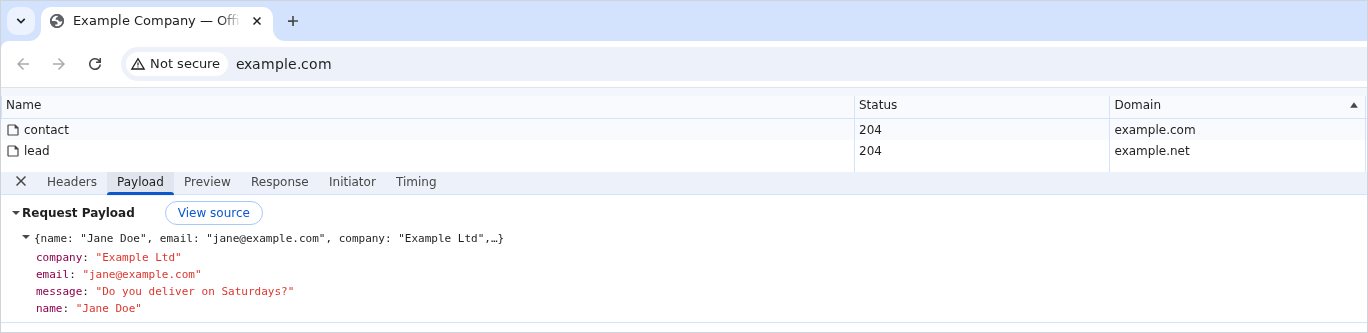
One form submission, two requests. The second carries the same name, email, company and message to a domain that is not yours.
What a bad result looks like.
- A field nobody has looked at in a year — a phone number on a newsletter sign-up
- A marketing checkbox that arrives pre-ticked
- A form that refuses to submit unless you accept marketing
What fixes it. Fewer fields, and a short note at the point of collection saying what happens next. A personal information collection statement is the document for that job.
Check 5: Someone can actually answer a request from a visitor
What the law actually says. Article 12(3) is unusually specific.
You respond without undue delay, and in any event within one month of getting the request.
You can extend that by two further months if the request is complex, or if there are a lot of them. But you have to tell the person about the extension, with reasons, inside that first month.
It’s a branch you announce. Not a grace period that turns up on its own.
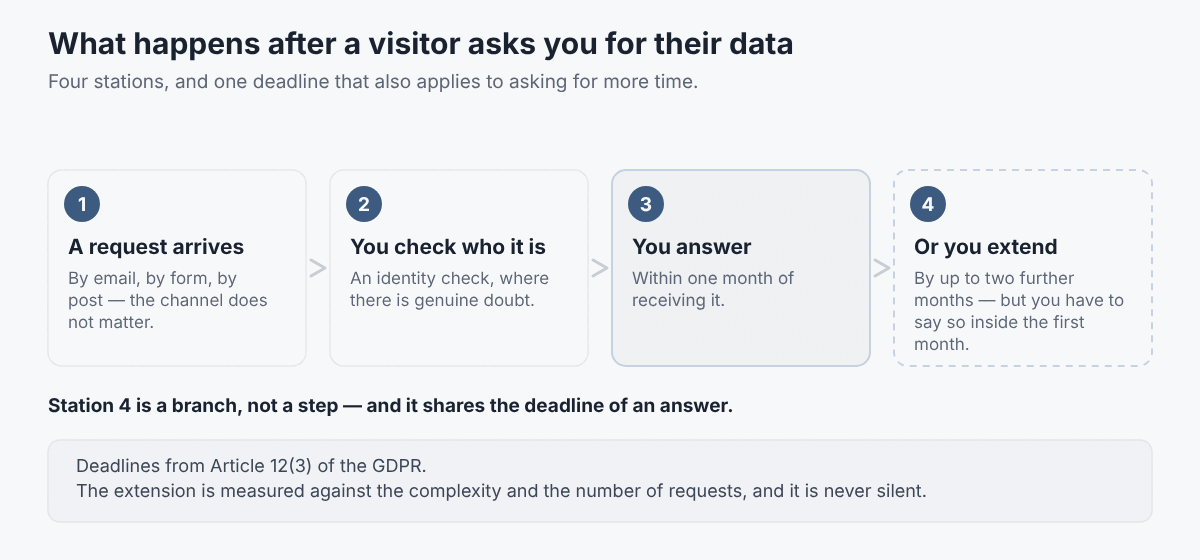
Article 12(3): one month to answer. The two-month extension is for complex or numerous requests — and has to be announced inside that first month.
How to check it. Send yourself an access request from an outside address, to whatever address your privacy policy gives. Then wait.
The question isn’t whether you’d answer. It’s whether the message reaches someone who knows what it is.
What a bad result looks like.
- The address bounces
- It lands in a shared inbox nobody owns
- It arrives in front of someone who has never been told this is their job
What fixes it. A named owner, a log with dates, and a standard form so people ask for something specific.
A data subject access request form does that, and it starts the clock in a way you can prove.
Check 6: Everyone handling your data has a contract and a country
What the law actually says. Anyone processing personal data on your behalf works under a contract or other legal act.
It has to set out the subject matter, the duration, the nature and purpose of the processing, the type of data and the categories of people involved.
Transfers outside the EU need their own safeguards.

For US suppliers there’s an adequacy decision covering companies in the EU-US Data Privacy Framework, and membership is a matter of public record. The register is run by the US Department of Commerce, and you can look a supplier up in it.
One caveat. The Danish authority published a reminder that a lawful transfer isn’t the whole question: first come the basics — legal basis, the processor contract, the rights of the people whose data it is.
How to check it. Write the list out. Then for each name on it, find two things:
- The data processing agreement
- The country the data sits in
What a bad result looks like. A tool with no data processing page at all.
Serious suppliers publish one. If you can’t find it, ask — and treat a vague answer as an answer itself.
What fixes it. The supplier’s signed agreement.
Internally, the matching document is a personal data protection policy for the people who handle the data. Contracts with suppliers don’t do much if your own team has no rules.
Check 7: Something actually gets deleted
What the law actually says. Your GDPR data retention period is one of the items Article 13 makes you state. “As long as necessary” only counts as an answer if you can say necessary for what, and until when.
For analytics there are published reference points. The French regulator’s criteria for audience measurement point to a visitor identifier that lives around 13 months without automatic renewal, and collected data kept no longer than 25 months.
Those are one national regulator’s criteria, not an EU-wide rule — but they give you a scale.

How to check it. In each system, sort by date and open the oldest record. Then find the retention setting in your analytics and read what it’s set to.
What a bad result looks like. All three of these at once:
- Your policy promises “as long as necessary”
- The oldest row in the database is from the year you launched
- Nobody has ever touched the retention setting
What fixes it. A written schedule, system by system, and one setting changed per quarter until reality matches it.
Check 8: Someone’s name is on this, and there’s a plan for the bad day
Three questions here. Two of them have shorter answers than most owners expect.
Do you need a data protection officer? It’s mandatory in three situations:
- You’re a public authority
- Your core activity is regular, systematic monitoring of people on a large scale
- Your core activity involves special categories of data on a large scale
A business site with a contact form and a visitor counter doesn’t automatically land in any of them.
Do you need a record of processing activities? There’s an exemption under 250 employees. It falls away if the processing is risky, involves special categories, or isn’t occasional.
A counter running permanently on a live site isn’t occasional.
What happens when something leaks? GDPR breach notification: 72 hours. You notify the supervisory authority without undue delay and, where feasible, within 72 hours of finding out. Unless it’s unlikely to result in a risk to people’s rights and freedoms.
How to check it.
- Say the responsible person’s name out loud. If you can’t, that’s your finding.
- Find where the breach procedure is written down.
- Look at the date on it.
What fixes it. A decision on paper, including the decision that you don’t need an officer and why. If you do appoint one, a letter of appointment puts it on the record.
Those 72 hours are not enough time to work out who’s in charge.
What this checklist leaves out on purpose
This GDPR checklist covers the surface of a website. Call it half of what the regulation asks of an organisation.
Not covered here: impact assessments, staff records, cameras on the premises, the rules for your particular sector.
National rules differ too: the directive behind Check 1 was implemented country by country, which is why the French regulator can exempt an audience measurement tool from consent while the picture elsewhere looks nothing like it.
For the half this doesn’t cover, the most useful free tool isn’t sold by anybody: the UK regulator’s data protection self-assessment walks a small organisation through the rest as a questionnaire.
One caveat: it’s written for UK law, which has drifted from the EU in places. That includes a statutory exemption for some analytics which the EU directive doesn’t have.
The ten-minute version
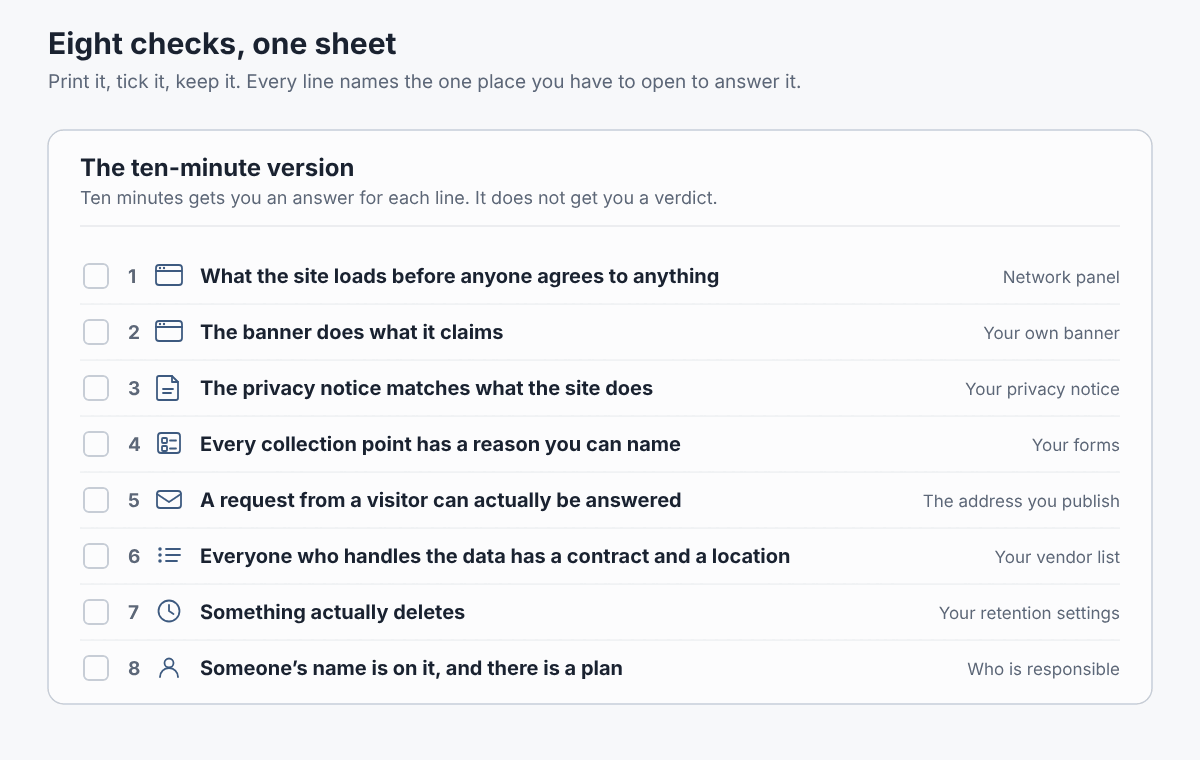
Reprint this card anywhere you like, with a link back to this article.
- In a private window with developer tools open, list every third-party domain that loads before you click anything.
- In the same window, check Cookies, Local storage and Session storage.
- Click reject and confirm the list from step one gets shorter.
- Read your privacy policy next to that list. Every domain should appear, at least as a category.
- Walk through your own forms and justify every field.
- Send yourself an access request from an outside address, to the address your policy gives.
- List your suppliers. For each one, find the processing agreement and the country.
- Find the oldest record in each system, and the retention setting in your analytics.
Print it. Tick the boxes. Write the date on it.
The date is the part that matters when somebody asks.

Eight boxes and a date. In a year, that is the whole record of the check you ran.
Three questions we get asked
Do I need a cookie banner if I only run analytics, not ads?
It depends on what the tool does to the device, not on what it’s called.
Article 5(3) is about storing information on the visitor’s equipment or reading it back. Regulators don’t agree on how far the exemptions stretch for plain audience measurement.
It’s a question for your adviser and your setup — settled by inspecting the tool, not by the label on its pricing page.
We’re not in the EU. Does this apply to us?
It can.
The regulation reaches processing of data about people who are in the Union, where you’re offering them goods or services, or monitoring their behaviour there.
If that’s you, a GDPR representative in the EU may have to be designated in writing.
Is a generated privacy policy enough?
As a skeleton, yes. As a finished document, no.
A generator can’t know which third parties your pages load, or how long your systems keep records. Those are the two sections that decide whether the document is true.
This article describes what the rules require and how to check your own site against them. It isn’t legal advice and doesn’t take account of your circumstances.